Html mark
Skill xuxinmaxen/html-mark
Drop coral-gradient pins on any HTML page, write feedback in an inline glass note popup, copy out as Markdown / Plain / JSON — or a For-AI format (unique CSS selector + HTML snapshot per pin) built to paste into Claude Code for one-pass fixes. Pins anchor to their elements and persist in localStorage. Glass-morphism aesthetic, keyboard-friendly, self-contained single file.From its SKILL.md
npx -y skills add xuxinmaxen/html-markAssembled from the repository path, not quoted from the project. Check it against their README if it does not work.
2 things to look at
- 2 stars2 stars. Stars are a popularity signal and not a quality one, but at this level it is likely that nobody has read this closely except its author, and you would be relying on your own review.
- runs commandsInstructs the agent to run 2 commands, including `cat ~/.claude/skills/html-mark/html-mark.js` and 1 more.
SKILL.md
11.5 KB, ~2.6k tokens by cl100k_base, as published. Nobody here has run it
HTML Mark — click-to-annotate overlay
Demo
Activate — a dark glass pill in the top-right corner. Click it or press M, then click anywhere on the page to start dropping pins.
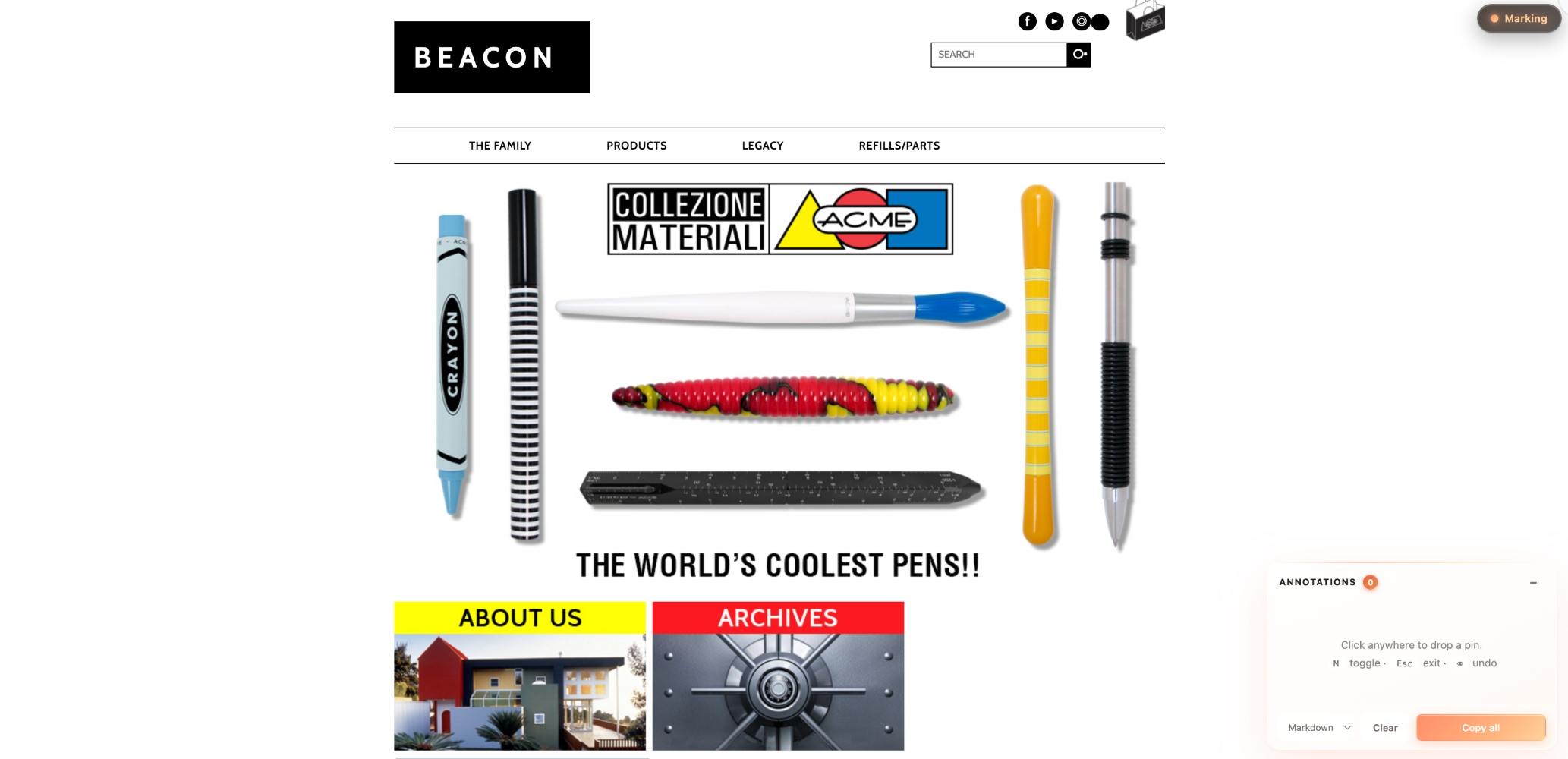
Annotate — every click drops a coral-gradient pin and opens an inline note popup. Press Enter to save, and the pin gains a small coral dot indicating "has note." Notes accumulate in the side panel; "Copy all" exports them as Markdown / Plain / JSON.
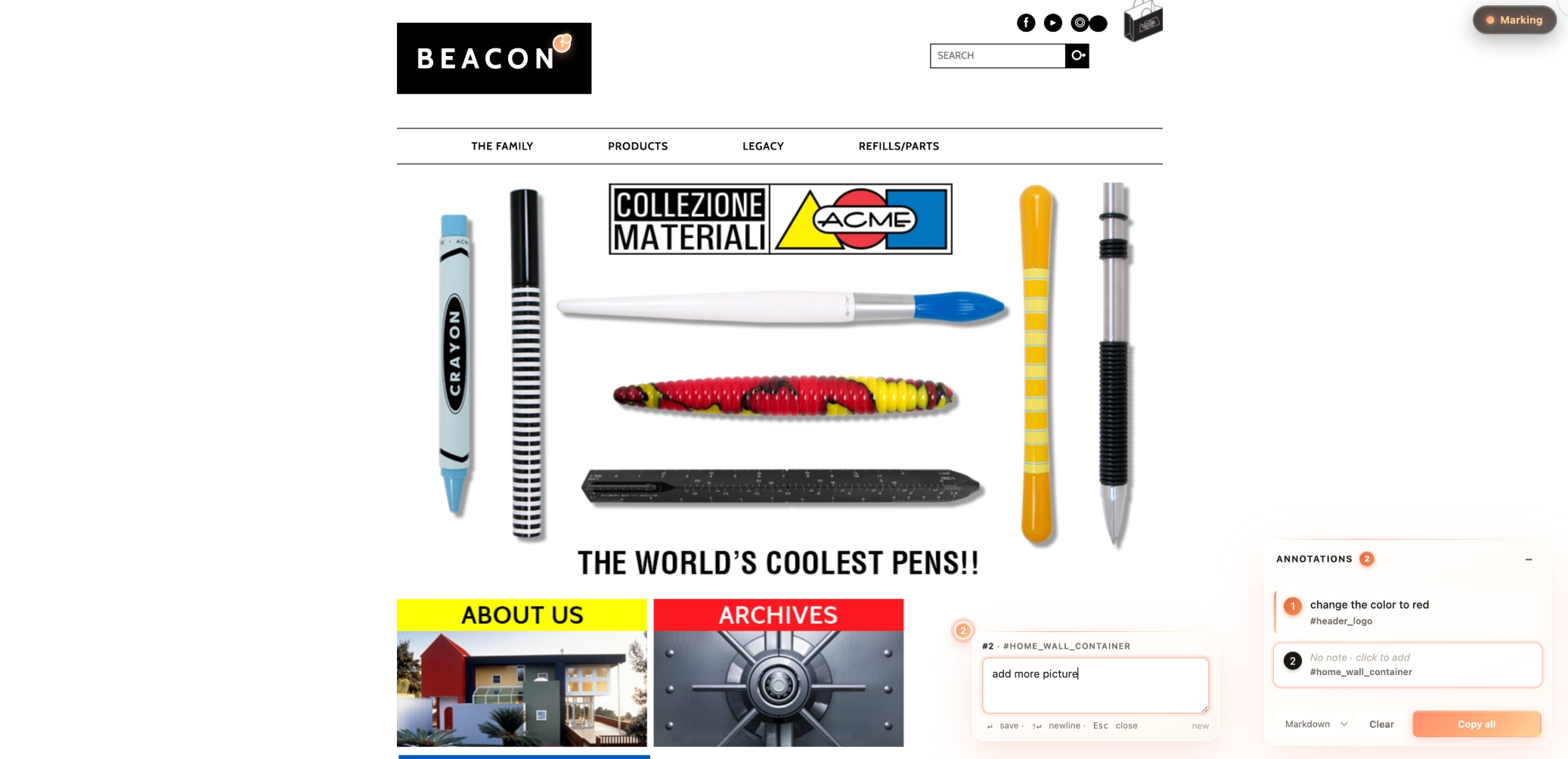
The copied output (Markdown) you'd paste into Notion / Linear / Lark:
**1.** change the color to red
   <sub>#header_logo · `#header_logo`</sub>

**2.** add more picture
   <sub>[data-mm-label] · `[data-mm-label]`</sub>
When to invoke
Trigger this skill when:
- The user wants to add review-style annotation capability to an HTML prototype (design mockup, Figma export, static page).
- The user is preparing to do design review: click → write feedback → copy → paste to PM / designer / engineer.
- The user wants a bookmarklet they can run on any web page to pin-annotate it.
Trigger keywords (both English and 中文 should fire):
- English: "add html-mark", "add mark mode", "add annotation pins", "click annotate", "let me mark up this HTML for review", "generate a mark-mode bookmarklet"
- 中文: "加 html-mark"、"加 mark mode"、"评审打点"、"标注模式"、"打点功能"、"给这个 HTML 加上标注"
What this skill provides
A single-file self-contained runtime (html-mark.js). After injection it gives the page:
- A dark glass toggle pill in the top-right (
● Mark/● Marking). OFF = gray dot; ON = glowing coral-gradient dot + honey text. - When ON, the cursor becomes a crosshair. Clicking any element drops a 22px coral-gradient orb (
#ff8d6b → #ffaf7a → #ffc890) with a scale-bounce entry animation. - An inline glass note popup pops open next to the pin — type "what should change here," press
Enterto save,Esc/ click outside to cancel-or-autosave. This is the core review connection point. - A glass Annotations panel floats bottom-right — draggable, collapsible to a single-row badge. Lists every pin's note + element label.
- Hover a panel item → corresponding pin scales up, target element gets a coral outline (visual cross-reference).
- Clicking a panel item or the pin itself re-opens the note popup for editing.
- Hover preview — while marking, the element a click would annotate shows a dashed coral outline, so "what will I pin?" is answered before the click.
- Pins anchor to their target element (position stored as a fraction of the element's box) — they survive window resizes and responsive reflows.
- Annotations persist in
localStorageper page and restore on reload, with a "Restored N annotations" toast.Clearempties storage too, and shows a 5-second Undo toast. - "Copy all" supports four formats — note is the body, element description goes to a sub-line of meta:
The fourth format, For AI, emits one block per pin with the reviewer note, a unique CSS path (**1.** This copy needs to be shorter — 8 chars max <sub>Button · "Get Started Free" · `button.btn-primary`</sub>#pricing > div:nth-of-type(2) > a), and an HTML snapshot of the element at review time — paste it into Claude Code and every note gets applied in one pass. - Keyboard:
Mtoggle,Escexit / close popup,Backspacedelete last pin,Entersave note,Shift+Enternewline. - A pin with a saved note wears a coral light-dot on its top-right corner.
- Panel:
−collapses,Clearempties all,×(on hover) removes one item. - Panel list items with notes have a vertical coral gradient bar on the left as a visual anchor.
Visual style: dark glass toggle + translucent white glass panels + coral → peach → honey warm gradient accent. Glassmorphism aesthetic — prominent without competing with the target page (especially well-suited to brand sites, premium designs, light / warm-tone palettes).
Usage scenarios
Scenario A — single HTML prototype file (most common)
Default action: inline the runtime as a <script> block before the target HTML's </body> (keeps the HTML self-contained so the user can email or AirDrop it).
cat ~/.claude/skills/html-mark/html-mark.js
Then use Edit to wrap the runtime in <script>…</script> and insert before </body>. Do not trim anything — the script is fully self-contained (CSS is inlined, DOM is self-injected, all class names use the .mm-* prefix for isolation).
Scenario B — multi-page project with a JS asset pipeline
Copy html-mark.js to project root or assets folder, then in each HTML:
<script src="./html-mark.js"></script>
It auto-initializes on load.
Scenario C — any URL, no source access (bookmarklet)
If the user says "I want to mark up a live web page / a competitor site," generate a base64 self-contained bookmarklet:
echo "javascript:$(python3 -c "
import urllib.parse
js = open('$HOME/.claude/skills/html-mark/html-mark.js').read()
print(urllib.parse.quote(js, safe=''))
")"
Alternatively, host on GitHub Pages / gist / Vercel and use the short-reference variant:
javascript:(function(){if(window.__markModeLoaded)return;var s=document.createElement('script');s.src='https://YOUR_HOST/html-mark.js';document.head.appendChild(s);})();
Optional: custom pin labels
If the target HTML has semantically opaque elements (a <div> representing a card without an id or meaningful class), add data-mm-label="My Section" and the pin will use that verbatim. The runtime already supports this — no need to change the script.
What NOT to do
- ❌ Don't rewrite the script — it's been tuned in
html-mark.js, use as-is. - ❌ Don't split the CSS out — the script injects its own
<style>tag, everything is self-contained. - ❌ Don't hardcode the toggle button into the target HTML's nav — the script floats it via
position: fixed. - ❌ Don't try to convert the panel to a "side drawer" or move its location (unless the user explicitly asks) — bottom-right floating is the validated default.
Verification
After injection, ask the user to open the HTML and confirm:
- Dark glass capsule
● Markappears top-right (gray dot). - Click the pill or press
M→ becomes● Marking(glowing coral dot, honey text), cursor → crosshair, glass annotation panel appears bottom-right. - Click anywhere on the page → coral-gradient pin drops with a bounce animation, glass note popup opens beside it (textarea + hint
↵ save · ⇧↵ newline · Esc close). - Type a note → press
Enter→ popup closes, pin gains a coral dot on its corner (has-note indicator). - Hover a panel item → corresponding pin scales up, target element gets a coral outline.
- Click
Copy all(default Markdown) → dark glass toast✓ N annotations copied as MD, clipboard contains formatted Markdown. - Press
Esc→ mark mode off; pressBackspacewhile ON → deletes the most recent pin. - Drag the panel header → panel moves; click
−→ collapses to a single-row badge. - While marking, move the mouse around → the element a click would annotate shows a dashed coral outline.
- Reload the page → pins come back with a "Restored N annotations" toast; resize the window → pins stay glued to their elements.
- Click
Clear→ toast offers Undo for 5 seconds; clicking it brings every pin back.
Version history
- 2026-05-17: First iteration on the Deeplumen Shopify App prototype. Transformed reviewer feedback from "screenshots + verbose text" to "click → one-key copy." Major communication efficiency win — the skill is consolidated from that workflow.
- 2026-05-18 (major refactor): The core UX gap was "pins recorded DOM descriptions but had nowhere to write review feedback." Fixed by adding the inline note popup that opens immediately after dropping a pin — making "what I think about this" a first-class citizen. Plus keyboard shortcuts (M/Esc/Backspace/Enter), draggable & collapsible panel, hover-to-highlight target element, and Markdown/Plain/JSON export.
- 2026-05-18 (visual redesign): Switched from "editorial restraint" (cream + bronze + charcoal) to glassmorphism + coral gradient. Toggle inverted to dark glass for stronger presence, pins became coral→peach→honey gradient orbs, note popup and panel adopted real backdrop-filter blur. Added pin-bounce and popup-scale micro-animations.
- 2026-05-19 (v1.0.0): Increased contrast on toggle and serial badges (deeper coral, more saturation). First public release on ClawHub under slug
mark-mode. - 2026-05-19 (slug rename): Renamed slug
mark-mode→html-markfor clearer scope. GitHub repoxuxinmaxen/html-markcreated. CSS class prefix.mm-*kept unchanged (implementation detail, decoupled from public slug). - 2026-05-19 (v1.1.0): Added demo screenshots, translated all docs to English. No runtime changes.
- 2026-07-03 (v1.2.0): Review-loop hardening release. (1) Element-anchored pins — position stored as a fraction of the target's box, recomputed on resize/reflow via rAF + ResizeObserver, so pins stop drifting. (2) localStorage persistence per page with restore-on-reload toast. (3) Hover preview — dashed outline on the would-be-annotated element while marking. (4) Unique CSS path per pin (
cssPath) stored alongside the human label. (5) For AI export format — selector + HTML snapshot per item, built to paste into Claude Code for one-pass fixes. (6) Undo toast for Clear. Verified end-to-end in headless Chrome (interaction script + cold-reload restore). - 2026-05-19 (v1.1.1): Moved screenshot embeds into SKILL.md (the page ClawHub renders) using absolute GitHub raw URLs so images are visible on both GitHub and ClawHub. Swap screenshot filenames so they match their content.
Consistency notes
- All UI elements use
.mm-*class prefixes — guaranteed not to collide with the target HTML's CSS. - Internal flag
window.__markModeLoadedis preserved (legacy name from initial release) so re-injection is idempotent.
What ships with it: 11 files
1284.9 KB alongside SKILL.md, 2 of them executable
docs/
- html-mark.jsruns39.6 KB
- index.html14.3 KB
examples/
- advanced.md2.8 KB
- basic.md2.1 KB
screenshots/
- 01-empty-state.png565.1 KB
- 02-with-pins.png608.4 KB


tests/
- test.md4.7 KB
- .gitignore55 B
- html-mark.jsruns39.6 KB
- LICENSE917 B
- README.md7.4 KB