Html report stable base
Use when supplied content or an existing HTML report needs a stable editable browser shell in either long-screen single-page mode or 16:9 PPT mode, including global and per-element styling, ECharts canvas support, standalone HTML delivery, or optional PPTX export in PPT mode.From its SKILL.md
npx -y skills add Lucas-Fong/html-report-stable-baseAssembled from the repository path, not quoted from the project. Check it against their README if it does not work.
One thing to look at
- 2 stars2 stars. Stars are a popularity signal and not a quality one, but at this level it is likely that nobody has read this closely except its author, and you would be relying on your own review.
SKILL.md
19.9 KB, ~4.5k tokens by cl100k_base, as published. Nobody here has run it
HTML Report
Purpose
Provide a content-neutral HTML report foundation. The calling skill, existing report, model, or user owns the topic, outline, copy, page count, colors, charts, images, and analysis. Template demo content is disposable and must never be treated as recommended report content or visual direction.
Confirm The Mode First
Every new report must explicitly use one mode:
single-page: one vertically scrolling, fluid HTML report. It supports editing, standalone HTML export, and click-triggered long PNG / one-page long PDF export through the local preview service.ppt: a slide deck with a fixed1440 × 810canvas, navigation, optional adaptive browsing,html-pptx-data, and click-triggered PDF/PPTX export through the local preview service. The PDF button exports the current edited browser snapshot, with each.slidecaptured as one PDF page.
If the calling skill or model already declares the mode, use it. Otherwise ask the calling skill or user before generating files. Do not infer or default the mode.
Shared Editing Contract
Both modes must keep:
- a compact bottom-right gear and right-side drawer; drawer width is
320pxand the label column stays compact so inputs remain usable; - drawer control groups as collapsed accordion sections by default, with one visible section open at a time; both modes use task-oriented common groups named
浏览与模式,全局样式,对象编辑, and图表数据; PPT mode also includes表格设置; both modes include a visually distinct fixed修复识别repair group above the导出footer; - each drawer group must include a short help sentence that explains when to use it;
- an explicit edit-mode toggle;
- global font family, L1/L2/L3/L4/metric/body/note sizes, body line-height, and table padding controls; the font-family control is a multiline textarea so long fallback stacks are editable; L-levels map to HTML headings but avoid confusion with HTML tags. Use direct numeric inputs without
min/max, not sliders; - typography level badges shown in edit mode sit just outside each element's top-right corner, so the badge names the selected text level without covering the content box;
- before editing or opening the drawer, global typography inputs must refresh from the currently rendered page values. For example, if the visible L1 element computes to
62pxwhile the template default is60, the L1 input must show62and user changes must start from62; - metric values such as
.metric .value,.metric strong, or[data-ppt-level="metric"]follow--metric-size; labels and descriptions inside metric cards remain body text; - direct text editing only while edit mode is enabled;
- per-element selection and independent inline styles;
表格设置and图表数据are separate context-aware groups: table controls are disabled until a table column/cell is selected or a table is manually recognized, while chart controls are disabled until an ECharts chart is selected or manually recognized; neither group is available while editing ordinary text, shape, or image elements;- color controls pair the native color swatch with a HEX text field that accepts pasted
#RGBor#RRGGBBvalues; - a selected-element panel with a delete command, plus lightweight reset commands for global typography, dimensions, text styles, and box styles;
- a manual recognition module in both
pptandsingle-pagemodes so users can select an unrecognized page element and mark it as text, shape, chart, image, or table; keep this module in the fixed repair area rather than mixed into common drawer controls; - recognizable icons for every drawer module;
- a compact, low-contrast footer line at the bottom with the GitHub project link
https://github.com/Lucas-Fong/html-report-stable-base, authorLucas Fong,MIT License, and© 2026, without repeating the same author/copyright text; - ECharts canvas rendering when supplied content includes charts.
Mark independently editable elements with exactly one type:
<h2 class="editable" data-editable-element="text">Title</h2>
<div data-editable-element="shape">Card</div>
<div class="chart" data-editable-element="chart"></div>
<img data-editable-element="image" src="..." alt="...">
Supported independent controls:
| Type | Controls |
|---|---|
text | width, height, font size, color, weight, alignment, line-height, background, border color/width, radius |
shape | width, height, fill, border color/width, radius |
chart | width and height; call the ECharts instance resize() after changes; ECharts data JSON editor for categories / series and advanced { "option": {...} } updates |
image | width and height; preserve its source and existing object-fit/aspect behavior |
Only one element may be selected. Independent styles are written inline and override global variables only for that element. Width edits must work for inline text, flex children, and elements constrained by max-width; the editor may set display:inline-block, a matching flex basis, and max-width:none on the selected element. Do not add free dragging or absolute-position controls.
Read references/drawer-contract.md when creating or adapting a template.
When adapting an existing HTML report and the user asks to preserve the style, also read references/existing-html-adaptation.md before generating the model.
Model Contract
Use scripts/build_html_report_from_model.py. The top-level mode is required.
For ppt, keep the existing slides model and structured objects:
{"mode":"ppt","title":"Deck","slides":[{"title":"Page 1","html":"...","objects":[]}]}
For single-page, use sections without PPTX objects:
{"mode":"single-page","title":"Report","sections":[{"id":"overview","title":"Overview","html":"..."}]}
Each section may include optional id, title, and class; html is required. The builder must reject a missing or invalid mode rather than choosing one.
Bundled Asset Skills
The plugin distribution also bundles two independent helper skills under skills/:
skills/echarts-charts: use when supplied report data needs a standalone ECharts HTML chart, an EChartsoption, or an embeddable chart asset.skills/generate-word-clouds: use when supplied keyword/weight data needs one or more horizontal PNG word clouds.
When a report needs these assets, read the bundled helper skill first and resolve its scripts/ and references/ paths relative to that helper skill directory. Insert generated chart HTML/options or PNG files into the HTML report model only after the helper output exists.
For a fresh environment, run node <skill-root>/scripts/bootstrap_html_report_deps.mjs before browser export, browser QA, PPTX export, or word-cloud generation if Node/Python dependencies or Chromium are missing. The bootstrap installs Node dependencies, creates <skill-root>/.venv for Python dependencies, and installs Playwright Chromium for this plugin. If the system python lacks dependencies after bootstrapping, use <skill-root>/.venv/bin/python for Python commands.
Visual Examples
Use these visuals as orientation for authors who are applying the skill to new content or adapting an existing report. They are examples of the shell and interaction pattern only; do not copy their dummy content into a report.
Single-Page Report
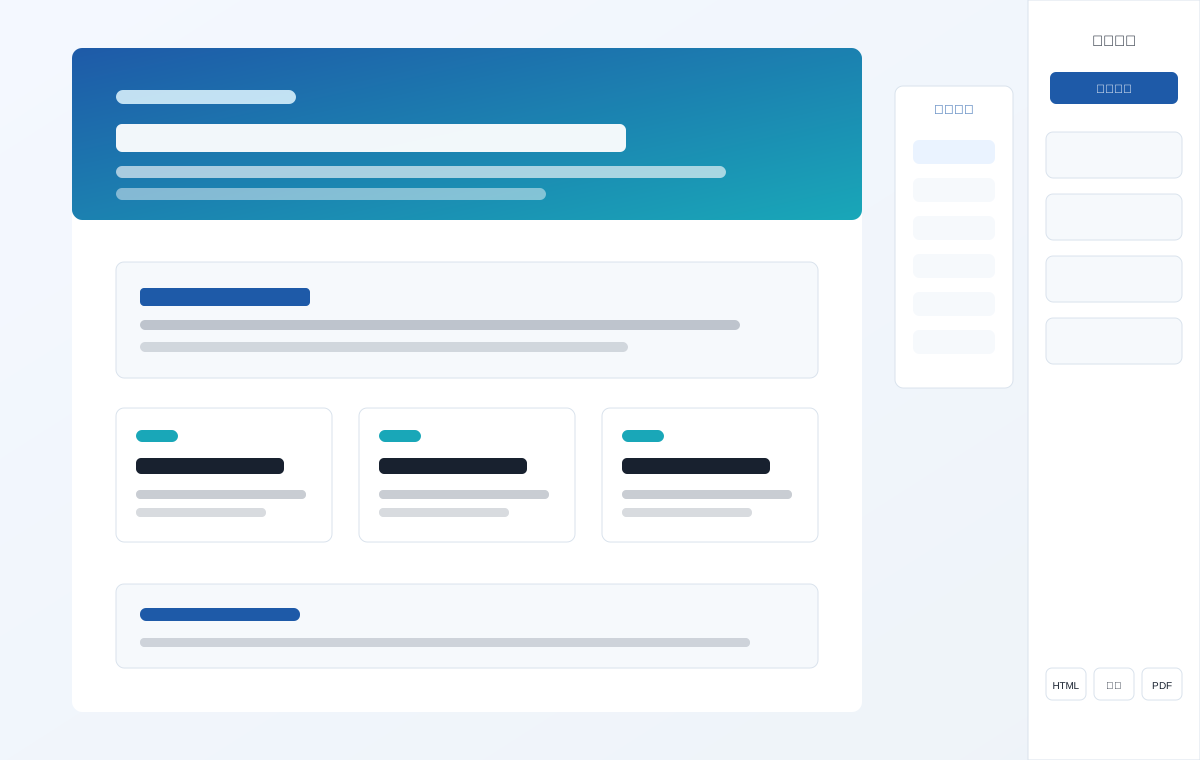
Use this pattern when the output should read as a long, vertically scrolling report: a hero or opening section, repeated content sections, optional side section navigation, and a right-side style drawer. Keep the report in normal document flow and let section height expand with the content.
Minimal model:
{
  "mode": "single-page",
  "title": "Market Audit",
  "sections": [
    {
      "id": "summary",
      "title": "Executive Summary",
      "html": "<h1 class=\"editable\" data-editable-element=\"text\">Executive Summary</h1><p class=\"editable\" data-editable-element=\"text\">...</p>"
    }
  ]
}
PPT Report
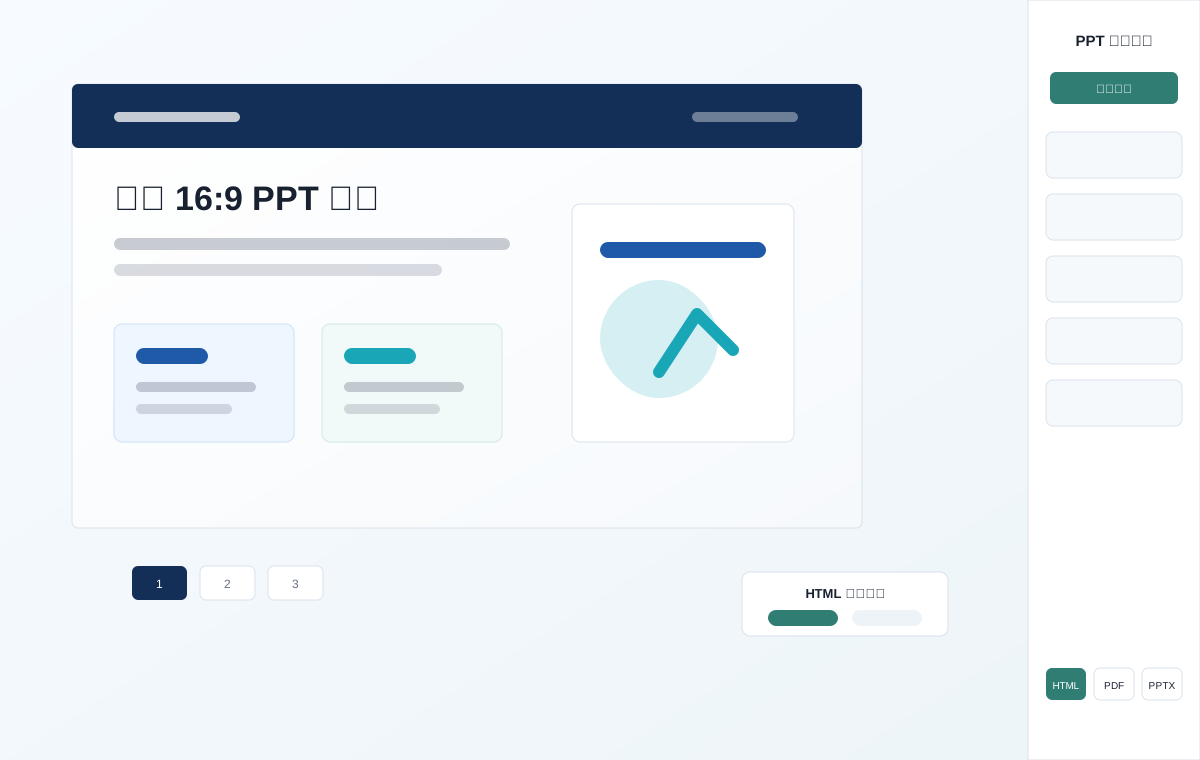
Use this pattern when the output must behave like a slide deck: fixed 1440 × 810 pages, page navigation, stable object geometry, and editable PPTX export. Keep page furniture fixed and non-editable, while report objects are represented in both DOM and html-pptx-data.
Minimal model:
{
  "mode": "ppt",
  "title": "Strategy Deck",
  "slides": [
    {
      "title": "Page 1",
      "html": "<h1 class=\"editable\" data-editable-element=\"text\">Page 1</h1>",
      "objects": []
    }
  ]
}
Adding GIFs Or Screenshots
If a future update adds a workflow GIF or screenshot, store it in assets/examples/ and reference it from this section with relative Markdown paths. Keep media small enough for GitHub review. Prefer short GIFs that show one interaction only, such as opening the drawer, selecting an element, changing a HEX color, or exporting HTML.
Mode-Specific Rules
Single-Page
- Use
assets/template/html-report-single-base.html. - Use normal document flow, responsive width, and auto height. Do not add slide snapping, PPT slide navigation, page numbers, or a fixed 16:9 canvas.
- Provide single-page section navigation from
.report-section[data-title]with exactly three styles:hidden,left, andright; default toright. - Navigation labels must contain at most six Unicode characters and keep the full section title in the link
titleattribute. - Edit mode must show H1/H2/H3/H4/metric/body/note typography labels for report content. Metric labels and descriptions remain body text; only metric values use the metric level.
- Keep
HTML / 图片 / PDFexport buttons. HTML must use the same modal choice as PPT:保留编辑or仅查看. 图片与 PDF 必须由用户点击后通过本地预览服务即时生成,不得在生成阶段预产出。Do not include PPTX,html-pptx-data,data-pptx-name, or PPT geometry sync. - The exported delivery HTML must retain all user edits, selected section navigation style, inline local CSS/JS/images/data, and hide the drawer and gear.
- Long PNG/PDF exports must be generated from Chromium's native
#reportscreenshot path, not SVGforeignObject, so they match the browser rendering and avoid print truncation.
PPT
- Use
assets/template/html-report-ppt-base.html. - Keep the fixed
1440 × 810canvas, equal left/right margins, page navigation, PPT/adaptive browsing, table column controls, and geometry scaling. - The PPT/adaptive toggle uses a compact presentation-canvas icon, not a Unicode box-character icon.
- Keep
html-pptx-data, unique per-slide object names, DOM-to-JSON synchronization, and editable PPTX export. - Keep
HTML / PDF / PPTXexport buttons. HTML must let the user choose保留编辑or仅查看; PDF and PPTX are generated only after the user clicks them in the local preview service. PDF/PPTX clicks must first synchronize DOM edits intohtml-pptx-data, submit the currentdocumentElementsnapshot to/api/export, and write outputs into<output>/exports/; PDF output must contain exactly one page per.slide. - Page furniture such as kickers, footers, and page numbers remains fixed, non-editable, and
12px/12pt. - Browser standalone HTML export must preserve edits and charts while hiding the drawer and gear.
Workflow
-
Require a supplied content source; do not invent report content.
-
Confirm
single-pageorpptbefore generation. -
Build from the matching template and model, or preserve an existing report while adding the matching shell. For existing HTML, use the adaptation fast path reference first.
-
Add
.editableto text content anddata-editable-elementto independently styled elements. -
Use real
<table>markup for every table-like matrix/list comparison. Style it to look like a card or divider-only pseudo table when desired, but do not use div-only pseudo tables for editable table content. -
In PPT mode, keep visible objects and
html-pptx-datasynchronized withdata-pptx-name. -
If any important content may have been missed, use the drawer's
补充识别module in either mode: click选择页面元素, click the page element, then mark it as文本/矩形/图表/图片/表格. -
If dependencies are missing in a newly installed environment, bootstrap them once:
node <skill-root>/scripts/bootstrap_html_report_deps.mjs -
Run the mode-aware static checker:
python <skill-root>/scripts/check_html_report.py <output>/index.html -
Run browser QA when Playwright is available and the change affects layout, editing, export controls, charts, or browser behavior:
node <skill-root>/scripts/qa_html_report.mjs <output>/index.html
- Run the editable-base acceptance check when the change touches the editor shell, drawer controls, element styling, chart/table editing, or PPT export layout. It covers drawer icons, edit/save labels, L-level controls, reset, delete, constrained element dimensions, manual recognition, ECharts data editing, and PPT export layout:
node <skill-root>/scripts/qa_editor_enhancements.mjs <output>/index.html
- To enable high-fidelity click-triggered exports, start the local preview service from a directory that contains
index.html, and return its URL:
node <skill-root>/scripts/start_html_report_preview.mjs <output> 5300
The service binds only to 127.0.0.1. It writes PDF/PNG/PPTX outputs after user action into <output>/exports/; it never pre-generates exports or rewrites <output>/index.html. If the port is busy, retry with the next nearby free port rather than stopping.
- Run the preview export acceptance check when changing export buttons, the preview service, snapshot cleanup, PDF/PNG/PPTX output, or before releasing the skill:
node <skill-root>/scripts/qa_preview_export.mjs <output>/index.html
This is intentionally heavier than the static checker because it starts the preview service and exercises Chromium-backed exports. Do not run it as a default generation step for every ordinary report unless export behavior changed or the user needs immediate export verification.
- Return
<output>/index.htmlby default. Export standalone HTML only when requested:
python <skill-root>/scripts/export_html_report.py <output>/index.html --out-dir <output>/exports --formats html
PPT mode may additionally request pdf,pptx.
- For scripted, non-interactive single-page long image/PDF exports only, use Chromium screenshot export:
node <skill-root>/scripts/export_single_page_long.mjs <output>/index.html <output>/exports
This produces <output>/exports/index-long.png and <output>/exports/index-long.pdf; it is not the default UI flow.
Performance Notes
HTML generation is usually fast; slow runs come from verification/export stages rather than the model builder. The common causes are:
- repeated Chromium startup in Playwright QA or export scripts;
- PPT PDF export screenshotting each slide at high device scale;
- PPTX export synchronizing DOM geometry through a browser before writing structured slides;
- standalone HTML export inlining large local scripts, charts, images, or data assets;
- running
qa_html_report.mjs,qa_editor_enhancements.mjs, andqa_preview_export.mjsserially for every report.
Default report delivery should run the static checker and only the browser checks that match the changed surface. Start start_html_report_preview.mjs for user-facing preview/export, because the service keeps Chromium warm for click-triggered PNG/PDF exports and reuses the submitted html-pptx-data for PPTX instead of launching another browser sync. Use qa_preview_export.mjs for release/export changes, not as a mandatory generation-time pre-export.
Quality Gate
Block delivery when any applicable check fails:
- mode is missing or conflicts with the template;
- the drawer, edit toggle, global controls, or four element protocols are unavailable;
- drawer control groups are not collapsed by default or allow multiple visible sections to remain open;
- independent edits affect unselected elements;
- chart dimensions change without an ECharts resize;
- ECharts data edits do not call
setOption(), do not persist edited data on the chart element, or are lost by standalone HTML export; - single-page output lacks section navigation controls, uses nav labels longer than six Unicode characters, or contains PPT navigation, PPTX controls, or PPTX JSON;
- single-page edit mode lacks any of the seven typography labels (L1/L2/L3/L4/指标/正文/备注), or metric labels/descriptions follow metric sizing instead of body sizing;
- a drawer module lacks its icon, reset/delete behavior is unavailable, edit mode does not use
编辑模式/保存修改, closing the drawer while editing does not first save/exit edit mode, global typography inputs do not start from the page's computed sizes, or constrained inline/flex/max-width element dimensions cannot be changed; - either mode lacks the task-oriented drawer groups, group help text, or the GitHub/author/license/copyright footer information;
- the drawer is wider than
320px, global controls use a slider or bounded numeric input, the PPT/adaptive toggle lacks its presentation icon, export buttons do not match their mode, either mode's HTML export lacks its modal editability choice, PPT PDF export does not submit the updated browser snapshot, PPT PDF output does not contain one page per slide, or preview-service exports do not reflect the submitted page snapshot; - color controls lack a pasted HEX path, or a valid HEX value fails to update only the selected element;
- the
补充识别module is unavailable in either mode, cannot mark unrecognized text as editable text, or cannot mark a real table's cells as editable; - PPT output loses its canvas, navigation, JSON contract, or object uniqueness;
- standalone HTML loses edits/assets/section navigation state, displays the drawer/gear, writes visible
\n, or keeps content after</html>.
Resource Map
assets/template/html-report-single-base.html: long-screen report shell.assets/template/html-report-ppt-base.html: editable 16:9 PPT shell.assets/template/shared/report-editor.cssandreport-editor.js: shared global and per-element editor.scripts/build_html_report_from_model.py: explicit-mode model builder.scripts/check_html_report.py: mode-aware static checks.scripts/qa_html_report.mjs: mode-aware browser QA.scripts/qa_editor_enhancements.mjs: editable-base browser acceptance QA.fixtures/editor-contract-ppt.jsonandfixtures/editor-contract-single.json: clean generation fixtures for editor acceptance.scripts/export_html_report.py: standalone HTML and PPT-mode PDF/PPTX export.scripts/export_single_page_long.mjs: single-page Chromium-rendered long PNG and one-page long PDF export.scripts/start_html_report_preview.mjs: localhost-only preview and click-triggered PNG/PDF/PPTX export service.scripts/bootstrap_html_report_deps.mjs: installs plugin Node/Python dependencies and Playwright Chromium when a new environment lacks them.scripts/qa_preview_export.mjs: local preview export and HTML export-choice acceptance QA.requirements.txt: Python dependencies for PPTX export, browser export, Excel extraction, and image handling.skills/echarts-charts: bundled ECharts helper skill with its own scripts and references.skills/generate-word-clouds: bundled word-cloud helper skill with its own scripts and references.references/drawer-contract.md: shared drawer and selection protocol.references/existing-html-adaptation.md: fast path for wrapping an existing styled HTML report without redesigning it.
What ships with it: 35 files
2710.4 KB alongside SKILL.md, 13 of them executable
.codex-plugin/
- plugin.json1.9 KB
agents/
- openai.yaml242 B
assets/
- examples/ppt-example.svg5.3 KB
- examples/single-page-example.svg5.6 KB
- template/assets/echarts.min.jsruns1005.1 KB
- template/assets/logo-deepseek.png2.7 KB
- template/assets/logo-doubao.png17.0 KB
- template/assets/logo-qianwen.png211.5 KB
- template/assets/logo-wenxin.png108.5 KB
- template/html-report-ppt-base.html1073.8 KB
- template/html-report-single-base.html26.5 KB
- template/shared/report-editor.css8.3 KB
- template/shared/report-editor.jsruns46.5 KB


fixtures/
- editor-contract-ppt.json1.3 KB
- editor-contract-single.json1.1 KB
- single-page-demo.json16.0 KB
references/
- drawer-contract.md9.7 KB
- existing-html-adaptation.md3.9 KB
scripts/
- bootstrap_html_report_deps.mjsruns2.8 KB
- build_html_report_from_model.pyruns6.7 KB
- check_html_report.pyruns4.7 KB
- export_html_report.pyruns27.5 KB
- export_single_page_long.mjsruns4.2 KB
- qa_editor_enhancements.mjsruns17.7 KB
- qa_html_report.mjsruns23.8 KB
- qa_preview_export.mjsruns8.8 KB
- start_html_report_preview.mjsruns13.6 KB
- test_editable_pptx_export.pyruns19.1 KB
- test_report_modes.pyruns22.3 KB
- .gitignore65 B
- LICENSE1.0 KB
- package.json80 B
- README.md6.4 KB
- README.zh-CN.md6.6 KB
- requirements.txt69 B